Once you start using Claude Code or Codex and think “I want to run several agents at once,” most people hit the same wall. Conductor, Superset, cmux. All three market themselves as parallel agent environments, and comparing screenshots doesn’t make the differences any clearer.
Here’s the conclusion up front: this choice won’t be settled by a feature comparison table. The real difference lives on your side — in how you work.
This article pulls out the two decision axes that generate the differences between the three tools, and walks you to the point where you can identify the right first pick for your type. It’s built around what matters after you adopt a tool, not around feature lists.
What are these three trying to solve?
Start with the problem all three are answering.
While you’re running just one agent like Claude Code or Codex, a terminal and VS Code are enough. But the moment you want a “refactoring agent,” a “test-fixing agent,” and a “docs-updating agent” running at the same time, trouble arrives fast. Multiple agents editing the same branch will collide. Open a dozen terminals and you lose track of what’s running where.
All three tools take on the same role: command center for the parallel agent era. So where do they diverge? The differences come from two things — the shape of the UI (GUI or terminal), and how each one relates to Git. Those two axes are the whole story of choosing.
Axis 1: GUI person, or CLI person?
The first axis is where your work actually happens.
Conductor and Superset both ship as native macOS apps. You can see agent status, diffs, PRs, and browser previews lined up in a single window. Good fit if you like the reassurance of a GUI, want to screen-share with teammates, or want dashboard-style visibility.
cmux, on the other hand, isn’t an app at all — it’s a native terminal. It uses the foundation of Ghostty, a popular terminal, internally, and splits panes tmux-style to line up your agents. Since it isn’t Electron-based, it runs light, and you can carry over the theme and font settings you already use in Ghostty.
This difference isn’t about taste; it’s about where you live day to day. For someone who spends their life inside the terminal and wants to control everything from the keyboard, a GUI app becomes a source of friction instead. Conversely, someone used to one-click GUI buttons who jumps into cmux will be relearning pane-switching keybindings from scratch.
If VS Code or Cursor is your main environment, go GUI (Conductor or Superset). If the terminal and Neovim are your home turf, cmux. This one question narrows the field.
Axis 2: worktree isolation, or working directly on main?
The second axis is your distance from Git.
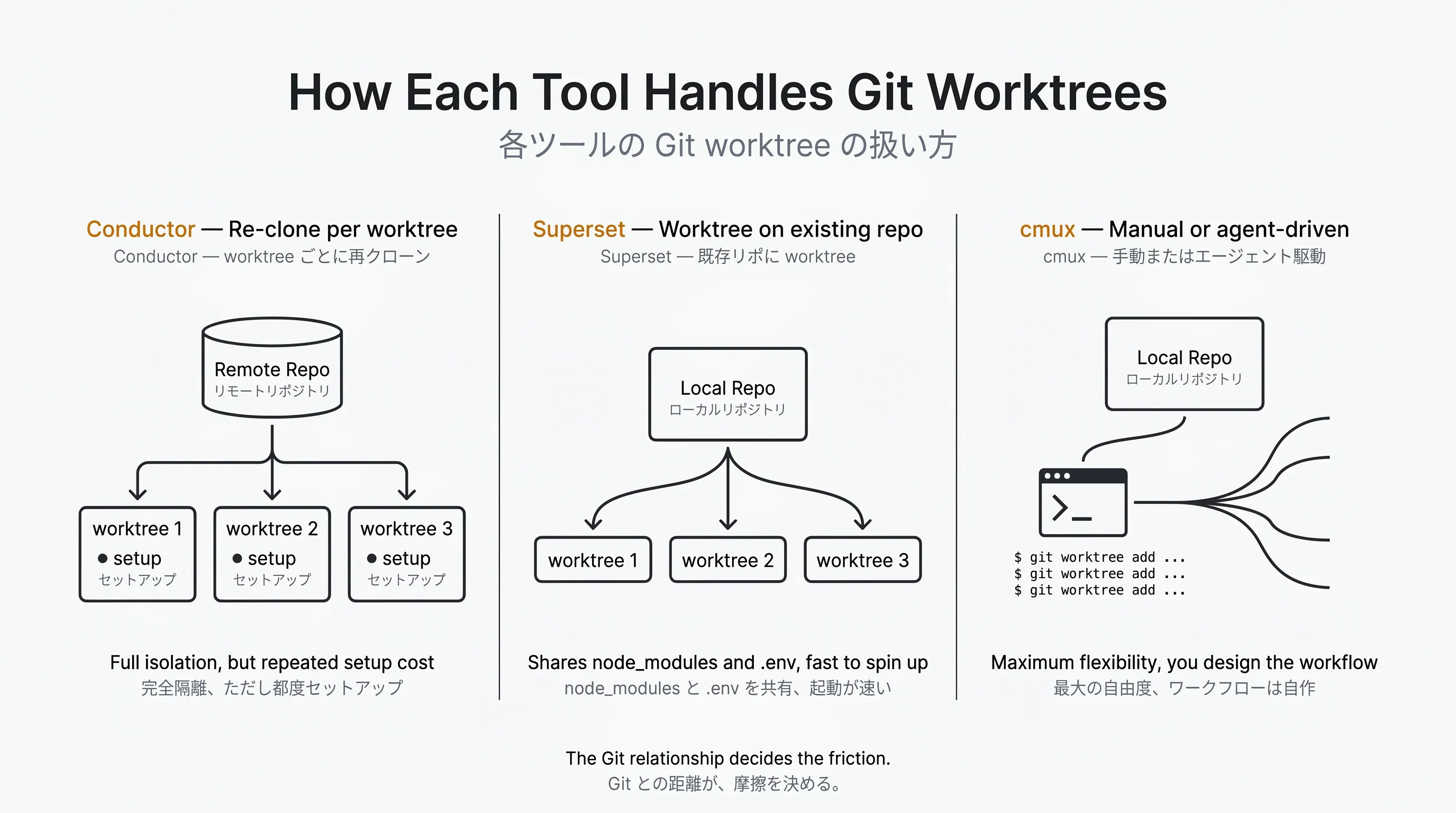
Conductor is designed around “create a new worktree each time and run the agent there.” Each agent gets an independent directory and branch, so collisions don’t happen. The catch: instead of using your existing local checkout, it re-clones the repository fresh, so every new worktree means reinstalling dependencies and reconfiguring .env files. Hacker News commenters raise the overhead of this re-clone approach repeatedly.
Superset auto-manages worktrees similarly, but grows them on top of your existing local repository. No re-clone needed, and node_modules and .env.development.local carry over as-is. That’s what people mean when they describe it as “close to the feeling of working directly on main.” It also integrates heavily with external editors (VS Code, Cursor, JetBrains, Xcode) and a built-in browser preview, so you can verify frontend behavior without leaving the app.
cmux has no native worktree automation. You — or the agent itself — create worktrees via the CLI. In exchange, commands like cmux new-split, cmux send, and cmux read-screen let agents spawn their own tabs and panes. Low-level and highly flexible, but you assemble the setup yourself.
In short: Conductor is for the “just isolate everything for me” crowd, Superset for the “let me use my existing repo as-is” crowd, and cmux for the “I want to build it all myself” crowd.
Find your position on the two-axis map
That’s the groundwork. Define your own style first, then go shopping — not the other way around with a feature table. That’s the core of this article.
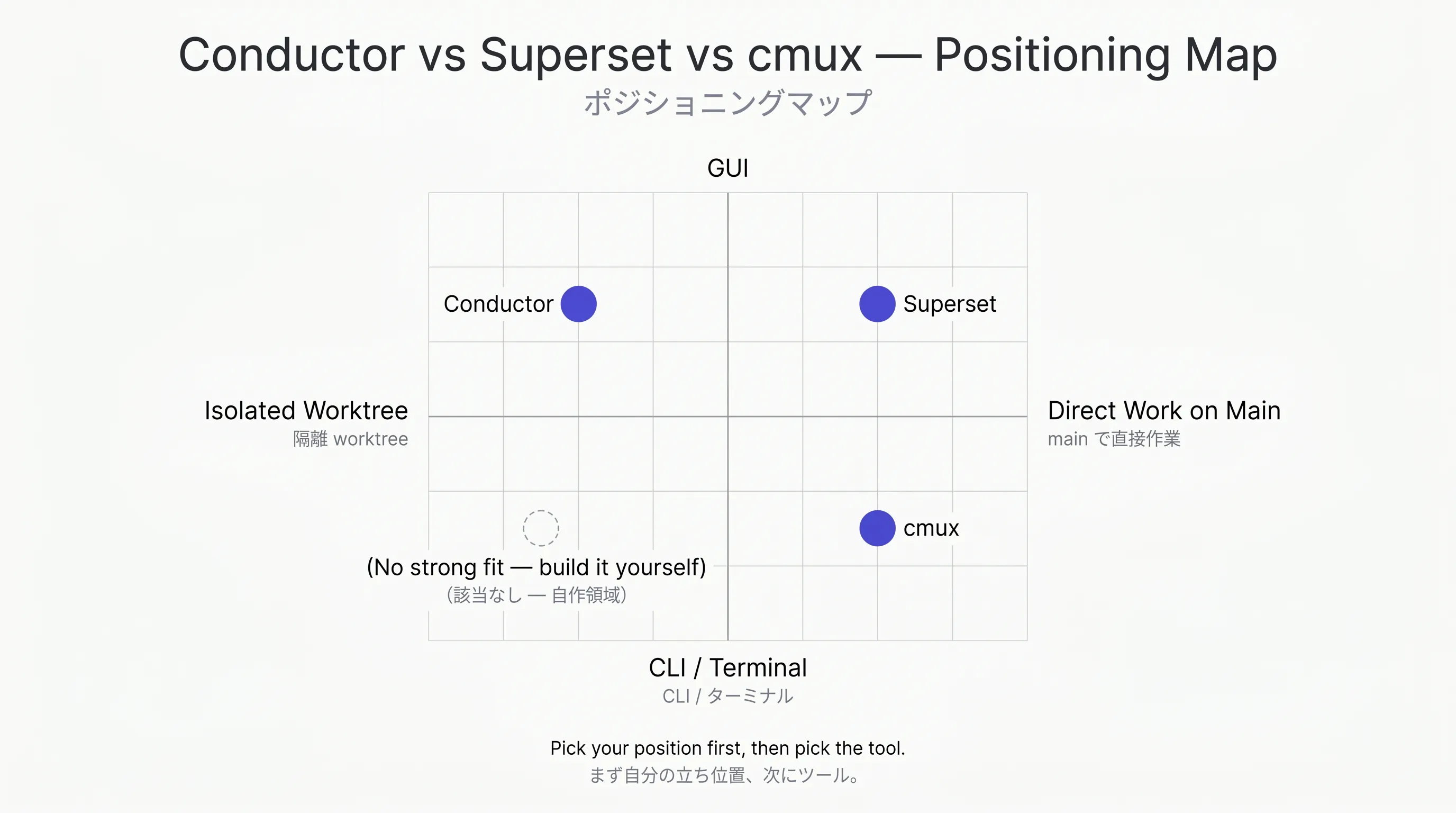
Picture a vertical axis of “GUI ⇔ CLI” and a horizontal axis of “worktree isolation ⇔ direct work.”
- Upper-left (GUI × isolation): Conductor’s position
- Upper-right (GUI × direct work): Superset’s position
- Lower-right (CLI × leaning direct work): cmux’s position
- Lower-left (CLI × isolation): no product here (territory you’d build yourself by scripting on top of cmux)
Where do you want to stand? Once you have that answer, you’re down to one or two candidates. What remains is checking the factors that bite after adoption — pricing, licensing, and reputation.
Conductor: a Mac app aiming for “Just Works” in a GUI
Conductor is a Mac app built by Melty Labs (Y Combinator S24), released in July 2025. Linear, Vercel, Notion, Ramp, and Spotify are all listed publicly as adopters.
Its strength is a tight build around a narrow set of supported agents. At launch it was Claude Code and Codex; as of August 2026, the official site says you can run three in parallel (Claude Code / Codex / Cursor) with Cursor added. API keys are bring-your-own (BYO) and the app itself is free. Create a workspace, launch one agent, and you can run diff review, PR creation, AI review, and CI check verification all from the GUI. Hacker News comments lean positive: “an honest GUI extension of Claude Code,” “does one thing cleanly.”
Two landmines. One is the re-clone approach mentioned above. Waiting every time you add a worktree adds up when you’re iterating heavily. The other was excessive GitHub permission requests in early versions — asking for full access raised privacy concerns (fine-grained permissions and gh auth integration have since been added, improving the situation).
Good fit if Mac is your main machine, you’ve settled on one of Claude Code / Codex / Cursor, and you value the reassurance of a GUI.
Superset: the neutral orchestrator option
Superset showed up on Hacker News in late 2025 and got attention on Product Hunt in March 2026, making it relatively new. The GitHub repository has collected over 12,000 stars (as of July 2026).
The eye-catching part is its commitment to being agent-neutral. It can invoke major CLI agents across the board — Claude Code, Codex, Gemini, Cursor Agent, OpenCode, Aider, and more. When a new CLI appears, you’re not locked to a wrapper and can pick up the latest features immediately. That’s a design decision grounded in real-world use.
Pricing includes a free individual tier plus a Pro plan at $20/seat/month. This is the only one of the three with clear paid billing on the tool itself. In exchange you get the features you want for team use: built-in browser preview, chat, diff editor, MCP server integration, and GitHub and Linear integrations.
User reactions include “changed how I think about coding with AI,” alongside a more sober question: “can a human really review ten parallel agents?” That isn’t a Superset-specific problem — read it as an early signal of a challenge facing the whole parallel agent era.
Good fit if you want to switch between multiple CLI agents, work directly on top of your existing local repository, or standardize on a shared tool across a team.
cmux: the rising star for terminal sovereigntists
cmux is an open source native terminal built by Manaflow (Y Combinator-backed). GPL-3.0 licensed, and as of April 2026 its GitHub star count exceeds 14,900 with the version at v0.63.2. There are reports of stars climbing 9,500 in two weeks, making it the fastest-moving of the three.
It inherits your Ghostty settings (theme, fonts) as-is, and lines up multiple agents through vertical tabs and pane splits. A blue ring indicates which agent is waiting for input, and a sidebar lists git branches, PRs, port numbers, and notifications. A CLI called cmux notify can be wired into Claude Code hooks so you get a macOS notification the moment an agent finishes.
Going further, there’s a built-in scriptable browser and a socket API. An agent can snapshot the DOM accessibility tree and automatically execute clicks and form input, or spawn another agent. For anyone who wants full CLI control, almost nothing else lets you reach this deep.
On Product Hunt, Brian Ellin (co-founder of Pilot) called it “my daily driver, and the best tool for managing multiple agents across multiple workspaces,” followed by users saying “the notification feature unexpectedly changed my workflow.” Support clustering from Ghostty users and people avoiding Electron apps is where this tool stands today.
Two concerns. One: macOS only — it doesn’t run on mobile or remote environments. Two: the GPL-3.0 license. On Reddit you’ll see “MIT or Apache would widen enterprise adoption,” so organizations with license review processes need to think carefully.
Pricing, licensing, and OS: the differences that bite in practice
Let me organize all of this into three practical dimensions that directly affect the adoption decision.
Pricing. All three are BYO API key, so Claude and OpenAI usage costs are separate. The only one with a difference in tool-level cost is Superset Pro ($20/seat/month); Conductor and cmux are free. For individual use, tool cost is a wash whichever you pick — but for team adoption, only Superset carries per-seat billing.
Licensing. Conductor is closed source, Superset is Elastic License 2.0, and cmux is GPL-3.0. This is easy to misread: Superset’s source code is public, but ELv2 is not an OSI-approved open source license. It restricts things like re-offering the software as a managed service, putting it in the so-called source-available category. cmux’s GPL-3.0, meanwhile, is viral — it requires derivative works to carry the same license — so if there’s any chance you’d embed it in your own product, you need a review. For personal development environments, none of these cause practical problems. If OSI-compliant OSS is a requirement, take cmux; if being able to read the source is enough, Superset; if you want branded reassurance, Conductor.
OS. Unfortunately, all three are macOS only. Conductor has a Windows waitlist, but at present none of the tools have official support for Windows or Linux. If Windows or Linux is your main environment, picking any of these three is difficult in itself, and you’ll be looking at alternatives like VS Code’s Agent mode or a Dev Container-based setup.
Your first pick, by type
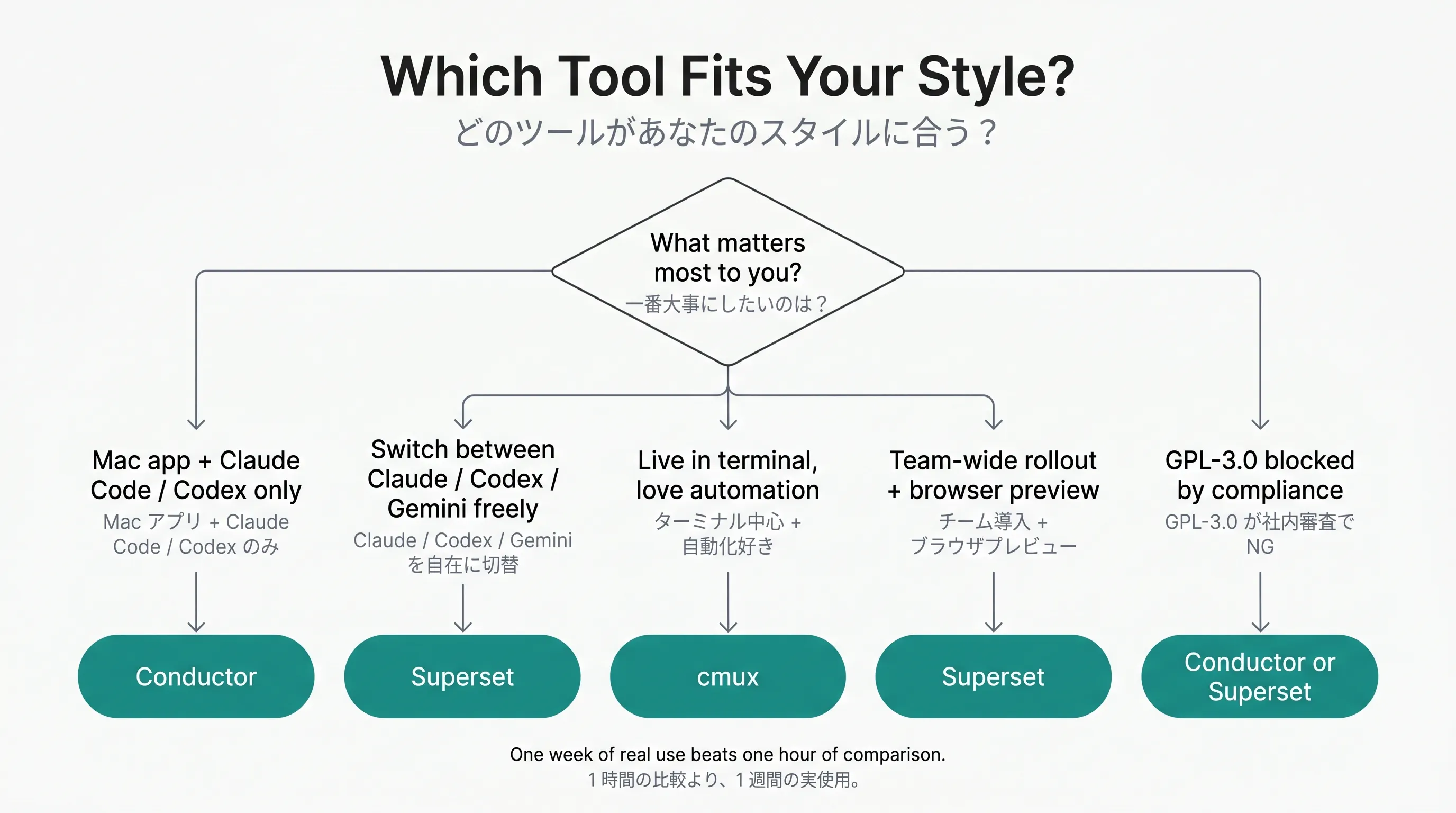
Combining the two-axis map with the practical factors, here’s a first pick by type.
- Committed to one of Claude Code / Codex / Cursor, and you want the reassurance of a Mac app → Conductor. Nearly zero configuration, and you can start parallel work inside the GUI right away.
- You want to switch between multiple agents (Claude, Codex, Gemini) depending on your mood → Superset. No wrapper dependency, and it keeps up with new CLIs immediately.
- You live in the terminal and want to grow your environment through customization and automation → cmux. There’s a learning cost, but what you can do past it is in a different class from the other two.
- You want a unified team tool, with frontend preview consolidated in one place → Superset. Browser preview and external editor integration work out of the box.
- You’re in an organization where a GPL-3.0 license review won’t pass → Conductor or Superset. Keeping cmux to personal evaluation is the safer call. That said, Superset’s ELv2 isn’t an OSI-approved license either, so depending on your internal policy, it may need a separate check.
Decide which of these five is closest to you, then try that row’s tool for a week. That’s the lowest-cost path to being wrong.
After you pick your first tool
Finally, let me make the case that this choice is a provisional answer.
How to actually get good at parallel agents has no settled best practice as of 2026. All three tools either didn’t exist a year ago or looked completely different. Six months from now another tool will have momentum, and one of these three may have shifted its position.
Which is exactly why you don’t need your first pick to decide everything. Check your position on the two-axis map, use whatever fits best at that moment for a week. If something feels off, move on. That cycle itself is what grows your working philosophy.
Start with Conductor and learn how easy a GUI can be, pick up agent-switching with Superset, then touch the depth of terminal automation with cmux. Climb that staircase over a few months and, through the act of choosing tools, you’ll gradually start to see what you actually want to build.
References
- Conductor official: https://www.conductor.build/
- Superset official: https://superset.sh/ (comparison page with Conductor: https://superset.sh/compare/superset-vs-conductor)
- cmux GitHub: https://github.com/manaflow-ai/cmux
- Conductor review (The New Stack): https://thenewstack.io/a-hands-on-review-of-conductor-an-ai-parallel-runner-app/
- Show HN: Conductor: https://news.ycombinator.com/item?id=44594584
- Show HN: Superset: https://news.ycombinator.com/item?id=46368739
- cmux Product Hunt: https://www.producthunt.com/products/cmux